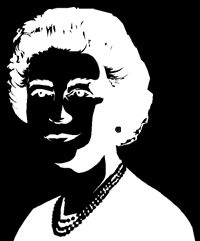
Since after-images always happen in opposite, or complimentary colors, the after-image of a negative picture should appear positive, or normal.
Concentrate on the white areas of this negative image for about 20 seconds. Count to yourself, or use the handy timer below. Now quickly look at the blank areas of this screen.
You will soon see a normal looking, positive picture which will quickly fade.
Notes
Displays a still image. The “timer below” is a separate java applet and is not included here.
Alt titles
The Queen
Source
http://www.sandlotscience.com/Aftereffects/Queen_Elizabeth_II.htm (via web.archive.org)
Queen Elizabeth II screenshots